

#21 — CLIs demand a new work(flow)
How do we keep the spark alive?

Two approaches to AI-assisted programming
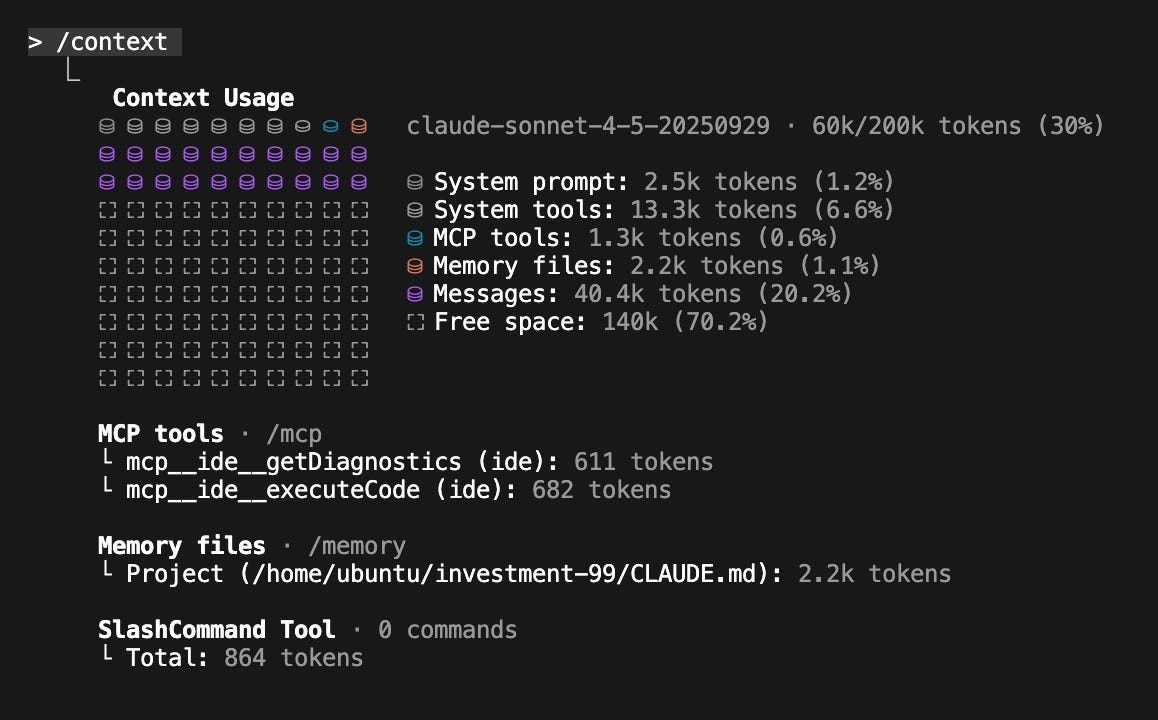
Given that vibe coding is a risk due to potentially wasting significant time and money, along with other non-functional risks like security, maintainability, or reliability (though recognizing it’s good for prototyping), Eduardo proposes two approaches to AI-assisted programming to mitigate these risks:
Very clear map: Before generating code with agents, detail everything you need, plan thoroughly, and embrace techniques like Spec-Driven Development—a heavier process, more structured approach, similar to RUP or SCRUM.
Clear compass but fascinated by the mystery of the territory: Small iterations, writing tests before or after, lighter process, considering context limitations—more like the lean software development approach. Methodical but more exploratory.
As Daniel Zavala, I also use Claude Code daily and it has completely changed my daily workflow. Although I don’t need to pay the $100 for Pro, for now I’m paying $20/month. Like him, I’m using Cursor connected via SSH to a local server and I pilot Claude Code with small steps in the Cursor terminal, which remains my favorite (custom) IDE for its autocomplete and its Ask mode for quick reviews. If I detect an error or see Claude Code is going down a path I don’t want, I add a “hey, do this instead” and it immediately corrects course. I’m more of the second approach mentioned above—I have a method, I like thinking like a software engineer, but I like the exploration too. And Claude Code feels different. It doesn’t iterate as much, doesn’t make as many mistakes, and the outputs inspire confidence. And I still haven’t tried Cursor’s Composer.
Last week, Cursor launched version 2. Their new foundational model, Composer, promises frontier-level results with four times the speed of similar models. What’s really interesting isn’t the company’s promises on paper—it’s how it feels day-to-day building software, the change in work(flow). Daniel Zavala was testing it and noticed the difference:
Before, each chat with the agent had a small tab at the top that was easy to lose. Now they show them in a much clearer sidebar. You can see which one you’re in and navigate between conversations without getting lost. It’s a small detail that makes a big difference when you’re doing pair programming—each agent ends up with such different context that being able to switch between them is very useful when you need a small change to something you thought you’d finished. When the agent applies changes, it shows you the files it edited in a list. You should probably review them—and you will—but at least now it’s more visible what it touched and where. It has a much clearer way of planning the tasks it’s going to perform and has an implementation for doing tasks in parallel, which is very useful. If it has to make changes in the back and front end, it executes these in parallel and finishes in half the time. You can ask it to do the planning in a new mode and review before it launches into programming, which is something I ended up asking for in many prompts.
For developers, flow is this magical zone where code seems to write itself, complex problems unravel naturally, and hours pass in what feels like minutes. In this article, Csaba Okrona enumerates the three major blockers to flow:
Insufficient cognitive challenge
Situational barriers
Internal factors
There’s no better or worse. It’s your choice. Map, compass, or both?
Regardless of your choice, I think the direction is clear with these new CLIs. However, as Daniel Zavala says, important improvements are still missing to polish that “flow”:
GitHub Desktop has had the perfect diff view for years. It’s my ideal complement for piloting agents: you keep checking changes, making commits, maintaining control over what gets integrated. Cursor has some incremental improvements in how they show changes, but they’re still just that: incremental. Having only two options—review change by change or hit “keep all”—leaves much to be desired. We need a way to review changes that isn’t file by file, but that gives us enough context about what was done. This is the area where I’d most like to see improvements in upcoming releases. There has to be a middle ground between micromanagement and blind trust.
This brings me to how UIs will evolve because we’re still supervising a lot, and doing everything from the terminal might not be the most convenient. I’ll keep sharing what I learn in this newsletter and on my Instagram account. I think this is a fascinating time for AI-assisted programming—let’s discover it together! And if you’re interested in a detailed technical approach to Claude Code and tips for maximizing its potential, this is well worth reading:

AI tools are not a crutch but a springboard
Learning to program, particularly for school-aged learners, is very different from developing IT solutions. Great to hear the perspectives from a university academic (Daniel Zingaro), a secondary school teacher (Irene Stone), and a student (Jedidah Ajala) on Vibe Coding. Thank you, Jane Waite, for hosting!
Here are my notes from the episode:
On the difference between learners and professionals using AI:
As one participant noted, vibe coding is quite different for learners who don’t have the experience to fix things when something goes wrong compared to professional developers who can look at the code and know what it’s doing.
Students really need to understand how code works. It’s not about generating working programs. If they can’t read or write simple code, then they’re not going to be able to evaluate any AI outputs.
On AI use in K-12 education:
In K-12, the use of AI depends a lot on the teacher—some are more inclusive than others, but in general it’s not used much in class. The episode mentioned that AI was only used in contexts like brainstorming requirements or checking if a test case was correctly formatted, so it was used with instrumental value rather than as a starting point for projects.
However, outside of school things change. The student on the panel explained that if you’ve got a project going on or a little side development you’re trying to build on your own, that’s when AI models and vibe coding get used. She shared that at her first university hackathon over the weekend, vibe coding made sense. She was in a team of four girls, and it was their first time being full-stack developers under timed conditions. That’s where they employed Claude Code and other chatbots to reach their solutions. She explained: “It was our original idea, but we took our previous knowledge. We told the AI we knew Python and SQL, but not React, and that we wanted to make a website. Then our development process was guided using vibe coding. As developers with very limited knowledge, we could still tweak the code that came out from the model to make a fully functioning solution. I believe that was the only reason it was possible within the 12 hours we were given.”
On teaching approaches:
Dan commented that he and Leo Porter wrote a book and definitely got it wrong by introducing AI immediately—students were installing all these tools without understanding what was happening behind the scenes. It makes sense, they thought, to delay the explanation of Gen AI, to first explain what components of the stack are doing what, and to work without AI first before adding it later. As he reflected, “It’s refreshing to be revisiting the start of that book, because that’s our job, isn’t it? To critique what we do, to reflect, to change things. That’s what makes our jobs so enjoyable in many ways.”
The secondary teacher’s perspective:
Irene, the secondary school teacher, emphasized that in high school teaching, AI can play a part, but it’s just one small part—a tool alongside everything else we already use. She starts with an offline IDE.
She made an important point: “Students are probably already using AI at home. We can’t control that. But what we can control is what’s happening in the class. As teachers, it’s our responsibility to create more opportunities for learning without AI. We need to spend those first few weeks not only building those basic programming skills or concepts, but also building relationships with students, which brings in trust. Because when we do introduce AI tools—and only if we introduce them, because we don’t have to—it has to be in that safe, trusting environment where students are comfortable sharing what they’re prompting, sharing what’s coming back, and having open discussions. But again, before we even go near AI, we have to teach them about AI, and that doesn’t have to involve any tools at all.”
On the “AI shoulder buddy” concept:
Jedidah shared an interesting observation about ironic situations where teachers ban AI use altogether but use it themselves to create worksheets or lesson materials. She noted that most students aren’t using it to just say, “do all my homework for me.” Rather, they’re asking the chatbot questions they would normally ask if the teacher was right next to them: “Why is this syntax error coming up?” or “Why doesn’t this line work?” instead of “Give me five bits of code for questions one through four.”
This led her to share a concept she’s been developing. In late 2023, she pitched the idea of an “AI shoulder buddy” to a Scottish Parliament Conference, drawing on her primary school experience: “When you’re in class learning how to tell time or count money, but you’re stuck, my primary school teacher would always say, ‘If you’re having trouble, first think really, really hard yourself. Then if you can’t think of a solution, ask your shoulder buddy—the person next to you. And if you both don’t know, then ask me and I’ll come explain.’”
She explained how this concept applies to AI tools as a coding companion: “You’re asking it very specific questions, but you have to really grasp the coding constructs first to ask the right questions. Just like asking your shoulder buddy lessens the burden on an overstressed teacher managing 20 or 30 students, AI speeds up the learning process by getting quick answers to small questions so you can move on with your task.”
On equity concerns:
The discussion revealed concerning patterns about equity. Students with high literacy levels or programming experience do really well with AI output because they’re good at code reading. But students with lower literacy find it difficult, leading to an increase in the digital divide rather than the reduction everyone initially hoped for.
Irene shared troubling observations from her research: “The confident programmers were able to prompt well and were doing really well. But the struggling students—and we know who they are in class—from what I observed and from analyzing so many ChatGPT conversations, student reflections, and focus groups, it was nearly getting worse for them. It really widened the gap. Those students were getting extremely frustrated. The AI wasn’t helping them at all.”
Even more worrying, she noted that on the surface, students who probably didn’t need AI help thought, “Oh, this is brilliant. I’m getting all this functional working code.” But when she analyzed the ChatGPT conversations, she could see errors everywhere: “This code is not actually doing what it’s supposed to be doing. That was worrying because misconceptions would build up, even something as simple as indexing—it was indexing wrong when we looked at strings and lists.”
She concluded: “I think it’s less equitable. Equity can only come if there’s proper scaffolding in place. Students have to be able to learn to read code. A lot of university research points to tools with guardrails, and they’re fantastic, but we don’t have access to them in schools. Students are using ChatGPT because that’s what’s free and what’s on their browser. So you have equity issues between different schools—schools paying for tools with better guardrails versus free tools. I think until access is fair and consistent, the fairest thing we can do as teachers is ensure our students can read code and provide opportunities for them to learn as much as possible before introducing AI.”
On assessment and goals:
Dan and Leo Porter discovered interesting patterns: students with prior experience have better scores on exams, but this isn’t the case for more creative, open-ended projects where those gaps disappear. This led Dan to reflect on assessments, what goals we’re targeting, and who might be treated unfairly by these assessments.
He shared an important perspective: “We don’t feel bad that students use AI to create projects that are motivating and mean something to them, their families, or their communities. What’s important is looking at the outcomes for our courses and honestly thinking about whether we need students not to use AI for this, or whether we don’t care—because different goals require different tools.”
On building classroom culture:
The secondary teacher reinforced the importance of building trust in the classroom and being present as a teacher. This allows everyone to share ideas together and recognize what makes a good or bad prompt. She emphasized that this co-creation aspect and sense of ownership is very important.
The student panelist shared that students are conscious of the ethical dimensions and that in many cases they prefer to learn the traditional way, only turning to AI when really necessary.
On self-regulation and intentionality:
Dan emphasized that self-regulation is one of the most important skills because we tend to use AI too early: “That immediacy is like chocolate, junk food. Understanding the trade-offs matters. There’s so much metacognitive awareness and self-control involved in working with AI.”
The student added her perspective: “At the end of the day, I don’t want AI to simply give me the answer to difficult programming problems, but I recognize it creates a moral dilemma, especially in coding work.” This makes me think that problem-solving is still a very important skill. It’s such a temptation just to get it done, but we need to learn rather than just get things done.
On research needs and recommendations:
Irene believes there’s more need for research at the secondary level—more classroom-based studies getting teachers involved. She noted that the focus is being put on tools, benchmarking them or developing tools with guardrails, which are important, but there’s not as much research on the actual effects of these tools on learning. She encourages more research on AI literacy.
Dan encourages slowing down to engage more with what’s coming out of the AI and being more intentional in learning.
Key takeaways from the panel:
“Take pride in your own work and your integrity, but know where and how to access help if necessary. AI tools are not a crutch. They’re more of a springboard for you.”
“Avoid the hype that’s out there. Create plenty of opportunities in the classroom to learn without AI. In fact, probably even create opportunities to learn without technology, because there’s so much AI built into it. And if you do decide to experiment with AI, teach your students—teach yourself actually—learn a little bit about AI first. There’s plenty of resources out there. Then, if you’re going to introduce it, create opportunities for your students to experiment, but get them to come up with guidelines, discuss what worked, what didn’t work, what might be misleading. Most importantly, teach them to be critical.”
Dan’s closing thoughts resonated with me: “We’re on the same team as students. They don’t want to cheat. They don’t want low achievement. They want to learn. That’s the mindset we have to have. There’s so much discourse about ‘they’re cheating, they’re using AI for everything.’ Maybe they’re doing that because your courses aren’t working in the AI era. Let’s try not to blame students for using AI. Let’s really look at our courses.”
Dan also encouraged experimentation: “I would love to encourage people to just do something. I’ve tried things in my classes that have blown up on me with AI, and students never react negatively to it. Students know you’re putting yourself out there and trying stuff. They’re not going to come at you. If it goes wrong, they probably expect it. They don’t know what’s happening right now. Nobody knows.
All students seek help, but what is academic help-seeking actually?
KSM just released a new episode of her podcast! In this episode, Shao-Heng Ko, Ph.D. candidate at Duke University, explains help-seeking and introduces a framework for understanding the many ways students look for help—from classmates and discussion forums to office hours and generative AI. They discuss what students value most (spoiler: timeliness), how instructors can audit their own help ecosystems, and how different student groups navigate these resources.
If you prefer to read, here’s a transcript.
Understand how students use them and understand how they complement with internal resources. And, the flip side of this is to think about what kind of values that our internal resources provide that’s not replaceable by the external resources. For example like, the effective value that undergraduate teaching assistant office hours has not yet been replaced by generative AI, although the technical side of it is pretty much replaced, at least in introductory programming contexts.
I would say just the people themselves. They serve as role models, they serve as like effective support. They can go as far as like provide metacognitive learning frameworks to the students if the TAs are like good at that, and these are values that we need to embrace and leverage because these are what make our internal resources irreplaceable by external ones.
My experience being a TA for Software Engineering for seniors is that they barely use TAs at all. I don’t have much experience yet, but I like to think like Shao-Heng that humans are irreplaceable simply by virtue of being human.

🔍 Resources for Learning CS
→ Need a MySQL Refresher?
If you want a refresher on how SQL/databases work, PlanetScale has a whole free tutorial on MySQL. Good stuff.
→ Stupid-fast search across Github repos
Grep is great for searching code samples when trying new libraries or APIs, and it has amazing filtering capabilities.
→ Visually dive into your code base
CodeViz is an extension for VS Code that aims to save you hours of searching for files and functions: it displays them in a graph.
→ 16-Chapter Guide to Angular, React, and Vue
You rarely see programming tutorials this good. For example, this is a comprehensive 16-chapter series where you’ll see the connections between these three popular JS frameworks: Angular, React, and Vue.
→ Explore Programming Languages
A few months ago, Adam fixed some of the rating scales on codigolangs.com, particularly for computation and compilation speeds. While it’s hard to get objective ratings, things are looking a little better now! The site features code examples, news, rankings, and discovery tools for programming languages from around the world.
→ Lessons from Etsy
This post from the Etsy engineering team was a great read. Etsy has more than 100 million one-of-a-kind listings with messy, unstructured data. How do they use LLMs to reliably extract product attribute data at this scale? This post shows how they’re using LLMs to turn seller descriptions, photos, and niche attributes into clean, structured data that powers search, filters, and recommendations. They share what they learned and the benefits they’re already seeing.
🔍 Resources for Teaching CS
→ Better Ways to Visualize Databases and Algorithms
I found this neat tool for designing entity-relationship diagrams. Highly recommended for explaining database schemas. I also found these beautiful diagrams that explain how cryptography or sorting algorithms work, with many other IKEA-like instructions for algorithm assembly here. Another library of diagrams you can use to make your flowcharts and technical diagrams look like they were hand-drawn by an artist is this one. Finally, I knew about Mermaid diagrams, but D2 was new to me. It looks like a clean syntax (and impressive toolchain) for going from text to diagrams.
→ A Linux Option for K-12 Classrooms
Zorin OS Education seems like a great option for learning, especially on a Linux-based platform. Projects like this should be more widely promoted and supported in educational institutions, especially K-12.
→ This New ggplot2 Book Looks Excellent
Nicola Rennie’s new book systematically breaks down advanced ggplot2 techniques across 200+ real visualizations. Covers data loading methods, exploratory analysis, custom styling workflows, and spatial visualization. Each chapter provides code with step-by-step explanations from sketch to final plot.
→ Teaching Kotlin?
The “Programming in Kotlin” course from JetBrains is now available in new Interactive Kotlin notebooks with runnable code and Markdown format. Read the full blog post and try out the new format. You can also access the slide-based course format.
🦄 Quick bites from the industry
→ What Makes a CS Degree Still Worth It
Why the CS degree still matters and what you should know if you’re starting one now? The core value of the cs degree remains rock solid: foundational theory and the rigorous problem-solving skills you develop. Additionally: financial leverage (still one of the best-paid fields), technical rigor that’s very difficult to replicate (4 years of depth), internship pipeline (nobody does it like universities), and networking (the social aspect matters a lot in today’s market).
→ Why University Still Matters for Learning Programming
In the AI era, it’s increasingly complicated to know how to learn programming the right way. In this episode, Martin talks about university and formal education with Carlos Azaustre, who is a content creator and professor in a web development master’s program and also in the Computer Engineering degree at Universidad Europea. Other topics come up like the DevRel role, the type of personal brand that opens doors, his opinion on universities (I agree 100%), the differences between teaching for YouTube vs. university, the programming education ecosystem, the risks of abstracting too much from fundamentals, the relationship between effort and learning, the CS curriculum, and how AI affects assessment. If you’re interested:
Here are more notes from the episode:
Carlos on the difference between DevRel and DevAdv: If you’re the developer advocate for a company or product, your mission is to showcase and evangelize that technology so people learn about it. Developer relations is more about coordinating communities. For example, Google has several communities (like Google Developer Experts), so you become the connection point between the company and the community.
Carlos on personal branding: If you build your personal brand well and what you share is knowledge and value, then ultimately it becomes a real-time résumé and opportunities start presenting themselves to you.
Carlos on the unique value of university and when self-teaching propels you: Many people consider university a waste of time because the programs are outdated, and that may be true in certain aspects. But I think it’s ultimately a life experience that also helps furnish your mind with ideas and personality—something worth going through if you can afford it. You have a curriculum you need to follow, which to some extent is good, because if you don’t know about a certain technology or way of working, without some guidance—even if it’s through courses or topics—I see it as very difficult to pull off self-teaching. You need an action plan. Could you do it self-taught and keep learning? Yes, but you might start studying a very advanced topic when you actually need another one first, so you need some kind of guide, some structure. And then self-teaching, once you have that foundation, you say, “Ah, I want to strengthen this area better,” but now you know which direction to go. That’s when self-teaching really propels you forward.
On entertaining vs. teaching: At the learning level, the pace is perhaps a bit different between how you learn in formal education like university versus how you learn on your own with a YouTube course. When you make YouTube videos, you speed up more, you explain everything faster so people don’t lose attention and the video doesn’t get lost to history. In the master’s program, it’s different because the class lasts two hours—you talk calmly, you repeat as many times as necessary, and everything is more relaxed. Even to teach on YouTube, you have to simplify concepts somehow. And bring it down to earth. And you have to sacrifice certain rigor. And it’s not easy to determine what rigor to sacrifice. Because sometimes there are things where you think, “I could explain this and it would be interesting, but if I explain it, I’ll lose 50% of the people watching.”
The programming education ecosystem: Carlos believes the best option would be university, because they’ll teach you fundamentals that might be hard to find in an online course. They exist—like Commit Academy—but it’s not the norm. Normally, bootcamps offer you, for example, an API, but you don’t understand why the HTTP protocol exists, why these response codes exist, and all of that is learned at university. In networking courses, you had protocols—you’d even build a protocol in C to understand how headers work, etc. You understand much better how everything works. In computer architecture, they taught you assembly language—not because you’re going to work programming in assembly, but so you understand, “Oh look, these instructions reach the processor, it has these registers, ah, variables, oh, right.” So you might think it’s torture, but when you mature, you understand the professor and it clicks. Martín comments that he had a hard time with hardware at university, but knows it’s true that it gives you an understanding of, for example, at the variable level, why Node consumes more RAM than languages like C and C++, when to use one thing or another—that’s also very important. Carlos comments that this doesn’t just happen with hardware but also in frontend. When they don’t see anything behind it, they think it’s magic, so you have to remind them that it’s HTML where the scripts to all the JavaScript files are linked, but because all the tooling behind it does it. And Martín also comments that this is happening now with cloud architecture and infrastructure (Vercel and Next, for example).
For Martín, there are risks in abstracting too much: One is that you’ll never have the desire or need to learn the rest. You abstract so much that by not knowing the fundamentals, you lose opportunities to move and migrate. Which I think, professionally speaking, is a very big risk. Knowing the fundamentals gives you the flexibility to change.
Facing pain/effort: Carlos recognizes that new generations want everything immediately. There’s not much tolerance for frustration. There’s a lot of blank page syndrome. AI helps a bit with that if you know how to use it well—it guides you. Now, if you copy and paste, it’s dangerous. You’re not ultimately putting in effort. As soon as you see difficulty, you quit. And that’s not how you learn. Carlos gives the gym example: When the muscle hurts, it’s because it hasn’t been worked. If it didn’t hurt, then everyone would be there lifting weights. When something costs you effort, that’s when you’re learning. Martín comments that he really notices this in terms of diving deep into concepts and problems. Not understanding doesn’t give you much peace of mind either; knowing what’s happening behind the scenes does. Certainly, perhaps this immediacy in terms of results and learning makes you not want to dedicate the effort and time that truly understanding what’s happening behind the scenes requires.
On curriculum, Carlos talks about his web development course specifically: including repositories, Git, collaborative work, teaching what you’ll encounter in companies. Not so much languages, but tools like lighter IDEs (VS Code forks).
How AI affects assessment: Carlos comments that in the master’s program, students have submitted code he hadn’t explained in class, or with AI-generated comments, or have imported dependencies they hadn’t even installed or tested... After this, Carlos reduced the number of projects to something a bit more elaborate where they also explain why they used something or didn’t use it. Fewer activities but slightly more elaborate ones. Carlos proposes changing the assessment format—maybe we need to return to oral exams, whiteboards, pen and paper... Carlos wants them to explain how they did it. Use AI to learn, to understand concepts.
🌎 Computing Education Community
CCSC MidSouth Regional Conference submissions will open on December 1, 2025, with a deadline of January 12, 2026. Submit here.
Two Career-Track Positions at University of Arizona: This is the link for the Lecturer track and this is the link for the Professor of Practice track. Southern Utah University is also hiring.
Many professors are recruiting PhD students. If you go to my reactions on LinkedIn, you will find many posts related to this and other open positions that may interest you.
🤔 Thought(s) For You to Ponder…
I really liked this conversation between Jacob Imam and Matt Fradd about the university system. Jacob’s idea of what a university should be is thought-provoking:
We started the college for students who are intellectually advanced and academically promising to earn their bachelor’s degree studying the Catholic intellectual tradition while simultaneously training in the skilled trades to earn their journeyman card. Because you get paid to train in the skilled trades, our students graduate without any debt—instead of being up to their eyeballs in it.
Puneet Patwari has been hired at Atlassian, but he’s giving us a great analysis of his process at Google, Uber, Walmart, and Amazon.
Related to my main theme today, there are devs like Juan who are frustrated and confused. What has changed in the way we work? Doing things faster, without thinking, just automating everything immediately. That way of working felt very different to him from actually solving problems. He raises a good question: How do we keep the spark alive?
Strong agree w/ Steven Mintz from UT - Austin:
We must re-center college around what is irreducibly human.
📌 The PhD Student Is In
→ Fall 2025 PhD Showcase
Our Fall 2025 PhD showcase was this week! Learned a lot about the cutting-edge research my doctoral friends are doing. Thank you to everyone showcasing projects and congrats on the winners!

→ My Podcast Note-Taking Workflow
Some people have asked me about the process I follow for listening to podcasts and videos and taking notes. I normally transcribe the episodes I’m interested in with TurboScribe or using the Snipd app, which automatically generates the episode text for me. From there, I split the screen in two and open my Google Docs on one side to jot down what I consider most relevant. It’s a workflow that helps me stay focused and not miss anything important.
→ Ways to Highlight Your TA Work
It’s only my first semester as a TA, but I’ve started to see ways to reflect my TA experiences on my website/resume. I really liked these two ways of showcasing instructional feedback:
Please feel free to share more examples in the comments.
→ My desk setup in 2025
Today I’d like to share my current setup:
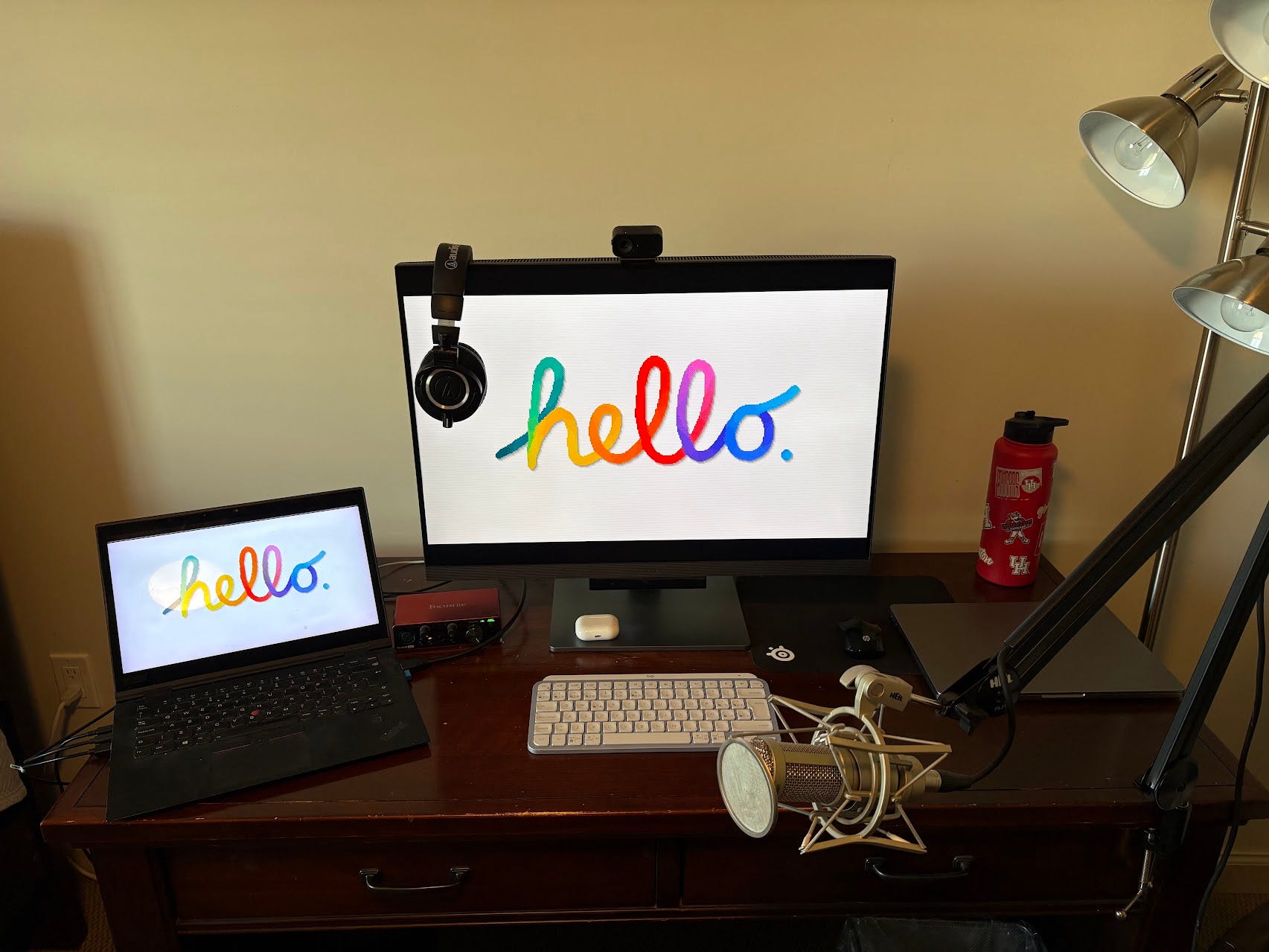
Monitor: RD280U 28.2” 4K+ HDR Programming Monitor
Laptops: On the left, Lenovo ThinkPad X1 Yoga Gen 3 14” Core i7 1.8 GHz - SSD 512 GB - 16GB RAM; on the right, MacBook Pro M2 Pro 16GB RAM
Keyboard: Logitech MX Keys Mini
Mouse: HP Wireless Mouse 200
Microphone: Heil PR40
Mic holders: Heil Boom, Roxdon HPF-1 Metal Pop Filter, Heil Sound Microphone Mount PRSM-C
Headphones: Audio-Technica ATH-M50x, AirPods Pro
Audio interface: Focusrite Scarlett Solo 3rd Gen
Cables: the sssnake SM6BK XLR cable, HDMI cable
Camera: Insta360 Link 2C
Accessories: SteelSeries Gaming Mousepad
→ Learning from Someone Who’s Always Ahead
In 2016, I spent almost a year in Bogotá working for Platzi—a really good year. Christian Van Der Henst is part of my passion for startups and entrepreneurship in general. He trusted me when I had barely any experience. I admire his ability to constantly reinvent himself. He’s always known how to be where things are happening. He just left his role as COO at Platzi and is now investing from SF. From this conversation with Nico Orellana, what stands out to me is that the world has already changed in how we interact with computers. The way we make software has changed. And that fascinates me. It’s now a central part of my research.

→ AI Agent Browsers
The way we browse the web seems to be taking a turn. We had Comet, Atlas, and now BrowserOS. I like how this last one shows the elements it detects on the screen. It really works. Dia from the Arc creators also looks interesting. You can already join the waitlist. We’re thinking about generating users/personas with agents in our Lab.
🪁 Leisure Line
I can’t wait for tomorrow’s game between The Cougars and Townson at the Fertitta Center. It will be my first live basketball game in Houston. I’m going with my research group colleague Mahdi, who will take me to a Persian restaurant beforehand.

Damn these Houston sunsets lately…

📖📺🍿 Currently Reading, Watching, Listening
Twenty Thousand Hertz is Dallas Taylor‘s podcast focused on the world of sound. In this episode, he follows the Saturday Night Live mixer on his last live show, about to retire after 40 years working in the 30 Rock building. I really enjoyed it.
I just finished the 3-hour Fr. Mike episode on Pints with Aquinas with Matt Fradd and I was really hooked. I recommend it without a doubt. The weekend could be a good time to watch it. If you work with young people, if you want to understand them better, or you simply feel like you struggle to have a fruitful prayer life, this episode is for you.
I’ve long been a fan of the Patagonia brand, the way they operate, and this little tour of their headquarters shows how they started (by making rock climbing equipment they themselves wanted to use) and how they’ve evolved.
For those who don’t know yet, I’m sharing Rosalia’s new album, which I’ve only listened to briefly but think is amazing.
💬 Quotable
In this life we cannot do great things. We can only do small things with great love.
― Mother Theresa

That's all for this week. Thank you for your time. I value your feedback, as well as your suggestions for future editions. I look forward to hearing from you in the comments.
Quick Links 🔗
🎧 Listen to Computing Education Things Podcast
📖 Read my article on Vibe Coding Among CS Students
💌 Let's talk: I'm on LinkedIn or Instagram